












LESSONS: TEN THINGS TO THINK ABOUT
CG PIPELINE
Building a CG Film Production Pipeline
I originally developed this material while teaching at USC, drawing directly from my experience as a professor and from consulting work in Animation production. Although it was designed to support student film projects, the principles apply equally to anyone creating original content or developing their own IP.
Every project has unique needs, but the guidance here comes from years of working with large studio teams in Los Angeles across a wide range of production pipelines. If you need help designing or refining your own pipeline, feel free to reach out.
Creating a CG film is a collaborative effort that requires a different pipeline than traditional Animation workflows. Data integrity, clear organization, and predictable handoffs between artists are essential. A strong folder structure and disciplined asset management are not optional. They are the foundation of a functional production.
What follows is a practical framework you can adapt as a starting point for your project.
Production Pipeline Overview
Producing a film is complex, but the pipeline breaks the work into manageable pieces and defines how those pieces connect. Think of the pipeline as the blueprint that keeps the project moving forward without chaos.
Core Pipeline Functions
Feedback Cycle
This phase focuses on visual cohesion and creative alignment. Work is reviewed, adjusted, and refined to support the overall vision.
Production
This is where the actual work happens. Assets are built, shots are animated, and sequences are assembled.
Resource Distribution
A strong pipeline ensures artists have the software, files, and tools they need without friction. This keeps the team productive and reduces downtime.
Asset Management
Production files are assets with dependencies. Organization must be structured but flexible. Too much rigidity slows creativity. Too little structure makes assets impossible to manage. The goal is balance.
Essential Components of a Production Pipeline
Production Software
These are the tools used to create the work. They define file formats, capabilities, and limitations. This category may also include custom tools or automation explicitly built for the project.
Standards and Best Practices
This includes naming conventions, folder structures, poly limits, texture sizes, and other constraints that keep production efficient and consistent.
Pipeline Software
This refers to scripts or systems that automate parts of the workflow or enforce standards. Examples include asset managers that control how files are linked, rather than relying on manual append or import methods.
Asset and Task Management
Resource management includes people, machines, assets, and render capacity. Precise tracking is critical. Assets and tasks are the two pillars of organization. Assets are nouns. Tasks are verbs.
Assets
Animation
objects
props
visual effects
characters
cameras
environments
shots
Assets are reusable. A chair or environment may appear in multiple shots across a sequence.
Tasks
art direction
concept art
character design
layout
modeling
texturing
Animation
lighting
rendering
compositing
Tasks have dependencies. Animation requires a rig. Texturing requires a model. Layout requires reference and staging decisions.
An effective tracking system combines an asset list with task dependencies. I prefer starting with simple lists and then moving into Gantt charts once scheduling and deadlines are defined. If tasks are not scheduled correctly, the entire plan can collapse.
To complete a basic shot where a character sits in a chair, you need at a minimum:
the chair
the room
the lights
the camera
the character
Each task should be reviewed by creative and technical leadership to confirm it meets both artistic and pipeline requirements.
Task Management Includes
budget
schedule
shot list
asset list
Artist Requirements in a Production Pipeline
From an artist's perspective, a pipeline must support the following:
Access to Initial Files
Artists need immediate access to the data required to begin work. Animators need layout and shots. Texture artists need models and reference libraries.
Functional Software
Tools must work reliably with the provided files. Broken workflows cost time and morale.
Clear and Usable Structure
Naming conventions, folder layouts, and linking rules must be consistent and easy to understand.
Seamless Integration
Completed work must drop cleanly back into the project without breaking downstream tasks.
Immediate and Iterative Feedback
Artists must receive feedback quickly and repeatedly while work is in progress, not just at milestones. The pipeline should support fast turnarounds, visual notes, and real-time clarification so decisions can be made early, adjusted often, and locked with confidence.
This ability to review, respond, and refine in tight cycles is what keeps production moving forward and prevents minor issues from becoming costly downstream problems.
Feedback and Review
Feedback keeps production aligned and moving forward.
Input Generation
Directors and design teams provide notes, references, storyboards, and visual direction.
Task Execution
Artists begin work using that input as guidance.
Regular Reviews
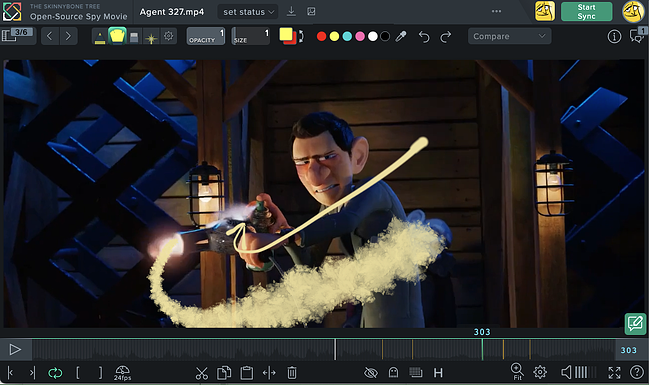
Daily or weekly reviews help catch issues early. Notes may include verbal feedback, drawings, or grease-pencil annotations.
Feedback Platform
Artists need a system that supports visual notes and interaction, not just comments.
Iteration and Finalization
Work is refined until it meets the agreed standard. Revisions may still occur later, so flexibility is essential.
Recommended Feedback Tool
The strongest feedback tool I have used in production is SyncSketch.
The ability to draw directly over Animation and models in real time is unmatched. Interactive drawing, live collaboration, and direct visual communication eliminate ambiguity.
Standout features include:
robust drawing tools
real-time interactive reviews
3D model review with view presets
pie menu workflow
ghosting and onion skinning
This tool supports how Animation teams actually think and communicate.
Suggested File StructurE
-
All of your pre-production files are housed here for easy reference
01 RESEARCHInspiration
Logos N Fonts
Movies
References
02 TWO SHEET
All of your two-sheet files are housed here for easy referenceFinal
Old
03 STYLE SHEETS
All of your research on look dev and style sheet files are housed here for easy referenceFinal
Old
04 CONCEPT ART
All of your pre-production files are housed here for easy referenceFinal
Old
05 BOARDS
All of your storyboard working files are housed here for easy referenceFinal
Old
Scans
Scripts
06 ANIM TESTS
All of your animation test work files are housed here for easy referenceFinal
Old
07 ANIMATIC
All of your animatic working files are housed here for easy referenceFinal
Old
08 PITCH BIBLE
All of your pitch bible work files are housed here for easy referenceFinal
Old
-
All of your camera and set files are housed here for easy referencing into Maya. These are your final-hero files.
01 RESEARCH01 Cameras
SC010
SC020
SC030
02 Environments
SC010
SC020
SC030
-
All of your shared assets are housed here for easy referencing into Maya. These are your final-hero files.
01 RESEARCH01 Cameras
SC010
SC020
SC030
02 Chars
03 Live Action
01 locations
02 casting
03 wardrobe
04 schedules
05 production photos
06 plates
04 Models
vehicles
weapons
05 Props
06 Rigs
-
All of your shots and your Maya project are housed here. This is where you set your project for the Maya workspace.
assets
autosave
clips
data
images
particles
renderData
renderscenes
scenes
SQ010
SC0010
SC0020
SC0030
SQ020
SQ030
sound
sourceimages
textures
-
If you hire a lighter, this is his/her workspace. You may also like to have a separate workspace for lighting even if you are doing it yourself. Just keeps files clean and only the hero work is referenced into the final shots. It is helpful to create a Maya workspace here so all of the files are saved in the right directories. Lights are, of course, shared assets but they get their own place in case you hire a lighter.
assets
autosave
clips
data
images
particles
renderData
renderscenes
scenes
SQ010
SC0010
SC0020
SC0030
SQ020
SQ030
sound
sourceimages
textures
-
If you hire a sound person or even if you just want to keep all of your dialog files in a separate place as you might be making revisions to them, this is where they go. Lights are, of course, shared assets but they get their own place in case you hire a sound designer. Audio is not subject to the Maya project since the audio will be revised and mastered in different software. It is helpful to keep the SEQUENCE/SCENE/SHOT structure, though.
scratch
SQ010
SC0010
SC0020
SC0030
SQ020
SQ030
-
If you hire a compositor, this would be their home to work. Final composites bring your CG to a higher level. You may be the one working in this directory. All the same, it’s better to break this part of production out of the rest and let it have it;s own home. Again, it is best to respect the SEQUENCE/SCENE/SHOT structure.SQ010
SC0010
SC0020
SC0030
SQ020
SQ030
-
If you hire an editor, this is where he/she will save their files. This area can get quite messy with lots of iterations, so I encourage you to set up this structure. Keeping and inbox and outbox of the files being exchanged is critical.
01 inbox
progress
final
SC0030
02 outbox
final
progress
03 audio
final
progress
-
Pretty explanatory. This is where all final files to be shared go. This will help you know where the files for submitting to festivals and competitions are for quick reference.
incoming
notes
outgoing
title credits
Maya Project Workspace and Rig Referencing
Maya Project Workspace
Always use the Maya project workspace. Maya is hardcoded to expect files in specific locations.
If assets are not where Maya expects them to be, paths break, and textures go missing.
To set a project:
Go to File > Set Project
Choose an existing Maya project structure or allow Maya to create one automatically
Referencing Rigs
Always reference rigs in scene files.
Why reference rigs
Smaller scene files
The rig cannot be broken
Updates propagate cleanly
This mirrors real production workflows
How referencing saves time
Animation can begin before the rig is final
Multiple artists can work in parallel
Updates require a reload, not curve transfers
Files are smaller
How to reference a rig
File > Create Reference > Options
Enable namespacing
Create a short namespace, four letters or fewer
Reference the rig from the correct project directory
Namespacing prevents node conflicts, preserves Animation, and allows multiple instances of the same rig in a scene.
To verify:
Open the Reference Editor
Confirm the path and namespace
Adjust or repoint the reference if needed
Clear naming and disciplined referencing are what allow large scenes and teams to function without data loss.